Showing posts with label 11 Graphics. Show all posts

Sunday, September 1, 2013

Year 11 DET Exam Revision Semester 2

For your end of year exam you should study the following content:

  • Read chapter summaries from your text book - all chapters from 1 to 12
  • Complete summary questions for chapters 7 and 10.
  • Revise summary questions that you completed from chapter 3 in semester 1.
  • Complete summary questions from chapter 2 (Design Process and Production Processes).
  • Revise your Designer Case Study from semester 1.
  • Practice Multiple Choice Questions.
Your Exam will have the following format:
  • 10 multiple choice questions
  • 3 short answer questions
  • 1 extended response question.
Become familiar with the following key terms used in exams in the short answers and extended response questions. These will usually determine how marks are given and the level of your answer should be.

7. Critically (analyse/evaluate)

Add a degree or level of accuracy depth, knowledge and understanding, logic, questioning, reflection and quality to (analyse/evaluate) Analyse - Identify components and the relationship between them; draw out and relate implications

6. Evaluate
Make a judgement based on criteria; determine the value of
5. Explain
Relate cause and effect; make the relationships between things evident; provide why and/or how
4. Discuss
Identify issues and provide points for and/or against
3. Describe
Provide characteristics and features
2. Outline
Sketch in general terms; indicate the main features of
1. Identify
Recognise and name

Tuesday, July 16, 2013

Promotional Graphic Design (Due Date - 30/8/2013)

In this unit of work you have the opportunity to design, produce and evaluate a design for a Promotional Graphic Product. You are to develop a client brief for a business or organisation that requires promotional advertising for their business. This could be advertising for one of their products, services or generally promoting their business or organisation. You are to use the design process to solve the design solution and demonstrate skills in using appropriate drawing skills and graphic design software to create the design concept for the client. Advertising products that you may produce could be: - Press adds, brochure designs, web page designs, billboards, corporate identity (logo – letterhead, business card etc.).

Download Assessment Rubric for this Task.


Things to include in your project.
  • Design Brief
  • Action Plan
    • Timeline - Gantt Chart
    • Finance Plan - Spreadsheet of costing & budget
  • Evaluation Criteria
    • Function
    • Aesthetics
  • Research for information and inspiration
  • Brainstorming & idea generation
    • Thumbnail Sketches of ideas for imagery and text.
    • Thumbnail Sketches with experimentation with Design Elements & Principles
      • Design Elements
        • Line
        • Shape - Form
          • Geometric
          • Organic
        • Tone
        • Texture
        • Colour
          • Schemes - complimentary, harmonious/analagous,
          • Warm & Cool
        • Letterform - Fonts
          • Serif
          • Sanserif
          • Script
          • Decorative - Display
      • Design Principles
        • Composition
          • Balance
          • Symmetrical - Formal Design
          • Assymmetrical - Informal/Dynamic Design
        • Hierarchy - Order or importance
          • Focal Point
          • Empahasis - Dominance
        • Contrast
        • Size
        • Cropping
        • Relationship
          • Design Grid
          • Rule of Thirds
        • Repetition - Pattern
  • Development and Refinement of Ideas
    • Concept Designs & layouts (Mockups & Prototypes) on Computer using either Photoshop, Illustrator or InDesign.
    • Experimentation with a variety of techniques, material and media
  • Production
    • Final Graphic Artwork in appropriate format for client
  • Evaluation
    • Evaluation throughout the design project - use annotations within your development work that explain your design decisions, explain the effectiveness of your designs, what worked and what didn't.
    • Analysis and evaluation of functional and aesthetic aspects of your design - evaluate the effectiveness of the design elements and principles that you have explored in your design, what worked well and what didn't. Has your design achieved it's intended function.
    • Written evaluation on the success of your design related to evaluation criteria outlined in your design proposal above.

Thursday, February 7, 2013

Kitchen Design Task - Due Date 31/5/2013

You are to take on the role as an interior designer. Your task is to redesign your home kitchen to make it more innovative in design and as a result improving your home lifestyle.
Use the factors that effect design to make it more innovative.
Function - look at the function of your kitchen. How can you improve the way it functions and how your audience functions within it?
Aesthetics - how can you improve the look of your kitchen? How can the design elements be used to improve the visual appeal of your kitchen?
Health and safety - identify any health and safety issues within your present kitchen, can you improve these?
Environmental - can you design the kitchen so that it is more environmentally friendly? By using recycled materials, conserving water etc.

  1. You are to use the chapter 1 & 5 of your text book to help you formulate a design brief, recording the needs of your client.
  2. Create a project management plan for this project outlining the key dates of completion for the project including a break down of when each stage of the design process will be completed – this should include a gantt chart. Refer to Chapter 8 (page 83) in your textbook to help explain what a gantt chart is.
  3. You should also create a finance plan outlining all the costs for your kitchen design development. This should be outlined on a spreadsheet using Excel. Refer to page 84 and 238 - 239 of your text book.
  4. Research principles of good kitchen design and make a dot point summary of the principles you need to take into consideration when designing your kitchen.
  5. Make a dot point list of innovations that you could add to your kitchen eg. something that makes your kitchen different and better than other kitchens, or something that hasn't been used yet. Link to innovative kitchen video.
  6. You need to create and conduct a market research interview on at least 3 people within the audience group that you are targeting your kitchen design to. Identify any needs or design opportunities and add these as requirements to the design brief.
  7. You are to create a criteria evaluation checklist that you will use as a tool to evaluate the success of your kitchen design throughout the design process. Refer to chapter 7 of your text book.
  8. Work through each stage of the design process to complete the design of your kitchen communicating with your client (The teacher) continually and referring back to the design brief throughout the process.
      • Start with an orthogonal sketch plan to scale on graph paper showing 3 views of your kitchen design. You can use the Idraw ipad app to help you create your image.

  9. Hand in all work from this point on 24/03/2013

      • Then use your scaled plan to create a 3D Model in Google Sketchup.
      • Make sure you export 2D graphic jpegs of your progress each lesson and mount these in your development work display folder for assessment.
  10. You are to create a materials, tools and techniques table outlining what you have used throughout the design process.
  11. You are also to create a health and safety checklist outlining the safety requirement for your kitchen design.
  12. Create a table that outlines the advantages and disadvantages of your kitchen design to the individual, society and to the environment. Refer to chapter 3 of your textbook.
  13. Your final design for kitchen should be presented as a 3D model created using Google Sketchup and should be fully rendered with your chosen textures and colour schemes. You should create a walk through animation of your design showing of the key design features of your kitchen. - Refer to chapter 12 in textbook (Computer-based technologies in designing and producing).
  14. Create a printed concept presentation of your kitchen design to present to your client. The presentation should include a 2D orthogonal drawing showing 3 views of the design and at least two 3D perspective representations of your kitchen design. This should be neatly mounted for assessment.
  15. All development work should be included in your visual display folder for assessment.
Kitchen Design by Courtney Shultz Year 11 - 2012.


Kitchen Design Task - Due Date 24/5/2013

You are to take on the role as an interior designer. Your task is to redesign your home kitchen to make it more innovative in design and as a result improving your home lifestyle.
Use the factors that effect design to make it more innovative.
Function - look at the function of your kitchen. How can you improve the way it functions and how your audience functions within it?
Aesthetics - how can you improve the look of your kitchen? How can the design elements be used to improve the visual appeal of your kitchen?
Health and safety - identify any health and safety issues within your present kitchen, can you improve these?
Environmental - can you design the kitchen so that it is more environmentally friendly? By using recycled materials, conserving water etc.

  1. You are to use the chapter 1 & 5 of your text book to help you formulate a design brief, recording the needs of your client.
  2. Create a project management plan for this project outlining the key dates of completion for the project including a break down of when each stage of the design process will be completed – this should include a gantt chart. Refer to Chapter 8 (page 83) in your textbook to help explain what a gantt chart is.
  3. You should also create a finance plan outlining all the costs for your kitchen design development. This should be outlined on a spreadsheet using Excel. Refer to page 84 and 238 - 239 of your text book.
  4. Research principles of good kitchen design and make a dot point summary of the principles you need to take into consideration when designing your kitchen.
  5. Make a dot point list of innovations that you could add to your kitchen eg. something that makes your kitchen different and better than other kitchens, or something that hasn't been used yet. Link to innovative kitchen video.
  6. You need to create and conduct a market research interview on at least 3 people within the audience group that you are targeting your kitchen design to. Identify any needs or design opportunities and add these as requirements to the design brief.
  7. You are to create a criteria evaluation checklist that you will use as a tool to evaluate the success of your kitchen design throughout the design process. Refer to chapter 7 of your text book.
  8. Work through each stage of the design process to complete the design of your kitchen communicating with your client (The teacher) continually and referring back to the design brief throughout the process.
      • Start with an orthogonal sketch plan to scale on graph paper showing 3 views of your kitchen design. You can use the Idraw ipad app to help you create your image.

  9. Hand in all work from this point on 24/03/2013

      • Then use your scaled plan to create a 3D Model in Google Sketchup.
      • Make sure you export 2D graphic jpegs of your progress each lesson and mount these in your development work display folder for assessment.
  10. You are to create a materials, tools and techniques table outlining what you have used throughout the design process.
  11. You are also to create a health and safety checklist outlining the safety requirement for your kitchen design.
  12. Create a table that outlines the advantages and disadvantages of your kitchen design to the individual, society and to the environment. Refer to chapter 3 of your textbook.
  13. Your final design for kitchen should be presented as a 3D model created using Google Sketchup and should be fully rendered with your chosen textures and colour schemes. You should create a walk through animation of your design showing of the key design features of your kitchen. - Refer to chapter 12 in textbook (Computer-based technologies in designing and producing).
  14. Create a printed concept presentation of your kitchen design to present to your client. The presentation should include a 2D orthogonal drawing showing 3 views of the design and at least two 3D perspective representations of your kitchen design. This should be neatly mounted for assessment.
  15. All development work should be included in your visual display folder for assessment.
Kitchen Design by Courtney Shultz Year 11 - 2012.


Tuesday, May 24, 2011

Year 11 Graphics Exam Revision - Semester 1

Factors affecting design
  1. needs
  2. aesthetics
  3. function
  4. environmental consequences
  5. finance
  6. ergonomics
  7. life cycle analysis
  8. quality
  9. OHS
  10. obsolescence

Design Process

  • design brief and identifying needs.
  • project management techniques and tools
  • cognitive organisers
  • research techniques - qualitative, quantative, primary and secondary.
  • what is market research
  • communication -  communicating ideas and solutions.
  • what is prototyping
  • what is manufacturing
  • identifying evaluation criteria
  • computer technologies used in design.
  • what are Australian Standards
Impact of design on individual, society and the environment. - Chapter 3 of Textbook
    • personal values
    • cultural beliefs
    • sustainability
    • safety and health
    • community needs
    • individual needs
    • equity
* Read through chapter summaries in your textbook.

    Wednesday, August 4, 2010

    Marketing Strategy

    A marketing strategy explains how a business plans to market their product. It involves evaluating the market environment, determining the demand, making decisions about supply of the product and setting achievable goals. The elements of  marketing are often described as;

    - People -  potential customers
    - Product - aesthetics, function and special features
    - Price - setting the price at an appropriate level
    - Promotion - advertising the product
    - Packaging - protection and presentation of the product

    Each of the elements interacts with the others in the marketing strategy. To be successful a new product must stand out from its competitors, ie. have unique selling points.

    Friday, July 30, 2010

    Thumbnail Sketches

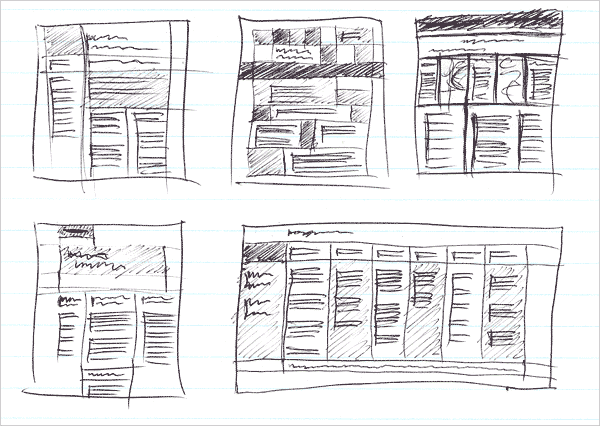
    Below are some examples of thumbnail idea sketches. These are created by the graphic designer in the initial stages of the design process to explore ideas for the visual content of their design.


    After the Graphic Designer has the visual content for their design as well as their text for their design they create thumbnail layout sketches for their design usually using fineliner pens and markers. The graphic designer will experiment with the design elements and principles when designing. Below are some points to consider when doing layout thumbnail sketches
      • Don't be to concerned about details. Use thumbnails to establish approximate locations for major elements.
      • Make sure your sketch is a scaled down proportional page (if doing sketches for a full page layout) there is no need to use a ruler. You're aiming for a general idea of how the piece might look.
      • Make lots of rough sketches. Repeat: lots of sketches. You'll rule out many design ideas quickly this way before wasting time in your page layout program.
      • Don't try doing these initial rough designs in your software, even if using dummy text and placeholder graphics. You're apt to get caught up in things like changing the fonts or doing perfectly aligned graphics. Save that step til after you've done the initial brainstorming for ideas with thumbnails.

    Below are some examples of layout thumbnail sketches.


    Monday, July 26, 2010

    Finance Plan

    Your projects are always constrained by a client's budget. Considering the costs, setting financial goals and sourcing cheaper materials to keep within the budget is all part of your project action planning. You should set up a finance plan spreadsheet for your project using Microsoft XL. Use the following example as a guide. Update your spreadsheet throughout your project making sure to manage your budget.


    Name of Project
    Item Purchased
    Supplier
    Cost ($)
    Balance ($)


    (Initial budget set)


    Total


    Thursday, May 20, 2010

    Year 11 Kitchen Designs

    Below are some examples of Kitchen Designs created by the Year 11 Graphics Students for their clients. They used Google Sketchup to create the 3D models of their kitchens. Double click on the images to see them full size.


    by Angga (Year 11)


    by Rebecca (Year 11)


    by Hayley (Year 11)


    by Jayme (Year 11)


    by Paige (Year 11)


    by Jack (Year 11)


    by Evan (Year 11)


    Wednesday, April 21, 2010

    Evaluation Criteria

    When you set up your criteria to evaluate the success of your design you should consider all the factors of design that are appropriate for your design. There should always be functional and aesthetic criteria but the other factors may vary. e.g. Not all designs will have ergonomic criteria for their design.

    Your Criteria to evaluate the success of the design factor should always be in the form of a question.


    Design Constraints
    How is this going to be evaluated?
    Is the kitchen space 5m x 4m in size.
    Have Australian Kitchen Standards been used to design the kitchen?

    Measure and check that the overall size of the kitchen is correct.
    Check a list of Australian Kitchen Standards an make sure they are met in your design.
    Sustainable Criteria (Impact on society & environment

    Has recycled timber been used?

    Visual check on the timber to determine whether it has been used before.
    Functional Criteria

    Does the kitchen cater for a family of 6?
    Is there a clear work flow for cooking and washing up?

    Check that there is appropriate working space for the family and that cooking and washing up appliances are located suitably.
    Aesthetic Criteria

    Have colour tones of blue and cream been used in the design?
    Have chrome handles and stainless steel appliances been used?
    Is the kitchen symmetrically balanced in design?

    Visual check on colour scheme.
    Visual check.
    Visual check on the overall design of the kitchen to see whether it is symmetrically balanced.

    Sunday, March 14, 2010

    Designer Case Study - Due Date 10/5/2013


    Designer
    Job Description
    Image of their work.
    Architect
    An architect is a person trained in the planning, design and oversight of the construction of buildings, and is licensed to practice architecture.

    Fashion Designer


    Furniture Designer


    Graphic Designer


    Industrial Designer


    Interior Designer


    Web Designer


    Your task is to investigate the types of careers available in the area of Design and provide a general overview of what each design career involves. You are then to choose one of these design careers eg.Graphic Designer and find out about the nature of their work. Complete the following criteria related to your chosen designer.
      Graphic Designer
    • Identify a range of career opportunities available for your chosen Designer in design and production.
    • Describe and analyse the specific processes they undertake when designing. eg. Production process of final design.
    • Describe the design process that the Designer uses from initial contact with clients to the final production.
    • Identify some of the other specialist personnel that the Designer works with within the design process and describe how they work together and the things they communicate about during the process.
    • Identify how the Designer uses ICT within the stages of the design process, name the stages of the process and how ICT is used at each stage.
    • Describe the prerequisites and pathway to enter a career in this Design field. eg. what courses do you need to study?


    The impact of Design & Technology on the Individual, Society and the Environment


    Before you decide on a design, you need to consider how your design (and the making of it) will affect others and the environment.
    Evaluate the environment impact of the resources you will use. Make sure your design is environmentally sustainable.
    If any feature of your design does not meet appropriate environmental, cultural/social and ethical standards, modify it. Write down your evaluation. Describe any changes you will make as a result of your evaluation.


    What are the advantages and disadvantages of your kitchen design?

    Advantages
    Disadvantages
    To the individual


    To Society


    To the environment


    Safety in Design


    Think about the safety issues involved in the way your design works. Think about the type of person you are designing for. Make sure your design will be safe for them.
    Sometimes there are legal standards of safety, labelling or sizing to be followed. Does this apply to your design project?
    Research and find out if there are any legal safety standards related to designing a kitchen. Make a list of these standards and safety issues that you must consider when designing your kitchen. Make sure you apply these to your design.
    Working Safely
    You have already thought about safety issues in your design product. Now look for possible problems in your workspace and the tools you will use.
    Make a checklist of the health and safety rules you should remember when you are making and using your design.
    Safety Checklist
    RuleWhat might happenFirst Aid in Case of Accident
    Workspace
    Clothing
    Behaviour
    Equipment

    Materials, Tools & Techniques


    Before you start making your design, there are a few more things to do.
    Decide: are you making a model, a plan or the real thing?
    Learn the skills you will need, always remembering your safety checklist.
    Make sure you can hold, mark out, measure, cut, shape, join and finish the materials you have chosen. Fill in the following table outlining the materials, tools and techniques that you will use in your project.
    Techniques
    Materials being used:
    ProcessTools RequiredSkill to be LearnedSkill Learned
    3D ModelingGoogle Sketchup SoftwareUsing basic drawing toolsYes
    Using the push-pull toolYes
    Creating Plan view of KitchenAdobe Illustrator SoftwareUsing drawing tools of softwareYes